
To identify users using your systems, you can ask for their basic user profile information, including.
Name
Email Address
Profile ID Photo
By requesting this information, you can identify users and restrict access.
Navigate to the Item where the form is assigned and select Forms.
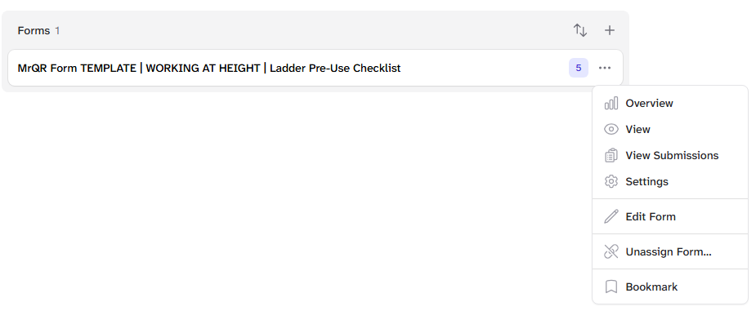
Select the Forms . . . menu and then Settings
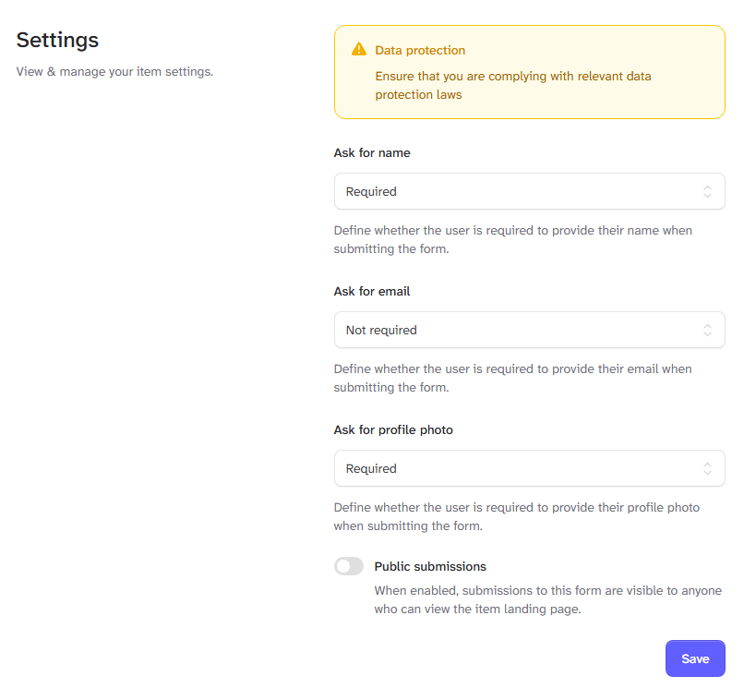
You can select the user information you require when they are submitting the form.
By default, selections are not required.
Ask for name - Define whether the user is required to provide their name when submitting the form.
Ask for email - Define whether the user is required to provide their email when submitting the form.
Ask for profile photo - Define whether the user is required to provide their profile photo when submitting the form.
The options to select are
Not required
Required
Optional
In addition, the Public submissions toggle: When enabled, submissions to the form are visible to anyone who can view the item web page.
Once you have updated the form settings, select the [Save] button.